Showing posts with label Cash Registers. Show all posts

How to Set Up a Cash Drawer

Properly setting up a cash drawer is an important aspect of any retail business. A poorly configured cash drawer can be a real problem when it comes time to make change for a customer or tally up the day's totals. Taking a few minutes to set up a cash drawer properly and creating procedures to keep it that way can eliminate many problems.
Instructions

 1-    Decide how much cash to start the drawer with at the beginning of the day or shift. Many businesses use $250, as it is a relatively low number that still allows for making change. You may wish to start with a higher or lower number based on experience or the nature of your business.

2-     Add change and bills to equal your starting amount and place them in the drawer. Only use $20 bills and smaller to make up this amount, as larger bills will rarely be used to make change. A good rule of thumb is to start with a mix of about $30 worth of rolled and loose change in the drawer and at least $100 worth of $1 and $5 bills.

3- Record your starting cash amounts, including the totals for each type of bill and coin. Keep this information in your cash-count log for future reference.

How to Set Up a Cash Drawer


4- Remove excess cash from the cash register at the end of every shift or whenever you reset the register for bank deposits. Repeat this procedure on a schedule to get an idea of how your cash levels vary over time. Make sure to leave the starting amount of cash at the end of each period.

5- Use your bank bag and get change early. Don't wait until you run out of change to make a run to the bank for change. Try to always have at least one roll of each coin on hand at all times.

Tips & Warnings :

    Keep rubber bands or paper clips in your cash register and clip large stacks of bills together for easy counting. Counting three stacks of twenty-five $1 bills is much faster than counting all seventy-five bills.

    Counting the cash drawer should be done by the manager or another trusted person in the business. Optimally, if one person is responsible for using the cash drawer, the manager should count the drawer in front of them to verify the counts and contents of the drawer.


Cash Registers for Sale

Cash registers for sale can be found in many forms, both new and used, including electronic, touch screen, POS, computer models and more.
Finding the right type of cash registers for sale is essential to running your business in the right way. Every retail business needs to have a register system, so that you can keep track of sales, and provide customers with the right type of receipt so that they can receive all of the transaction information that they need. Plus there are a variety of different types of cash registers for sale, so you’re bound to find just the type that you need, no matter what you’re looking for. There are so many different types, there’s bound to be a register to suit your business and it’s just a matter of finding the most ideal type.

When it comes to buying any type of cash registers for sale, the most important thing is finding the type that’s guaranteed to work for you the best. That means you want a register that gives you the performance that you want based upon the type of transaction that you need to carry out, as well as the kind of information that you need to track within your system. The most simple types of cash registers for sale is always going to be the basic calculator types.

Cash registers for sale can be found in many forms, both new and used, including electronic, touch screen, POS, computer models and more

These are the oldest types of cash registers for sale, and are ideal for literally any purpose. Whether you own your own small store, or if you are having a garage sale, this is the type of calculator that you need. It can track very basic cable information, can print out receipts, and is even capable of storing cash in a protected drawer at the bottom of the unit. With this, you can add up price tags, and total them in any way that you need, so that you can gain access to your cash drawer, and provide anyone with just the type of change that they need exactly.

Cash registers for sale can be found in many forms, both new and used, including electronic, touch screen, POS, computer models and more

When you’re looking for something more from your cash registers for sale, you’re going to want to go with POS enabled registers. These are the much more advanced type, and enable you to install a whole custom Point of Sale system within your store. This will track your entire inventory using barcodes, and will allow you to print out complicated receipts that list literally every single item that was purchased. This way customers can better keep track of their purchasing records, and you can keep track of your sale records, so that you’re able to know when you need to order new items, or restock some of the more popular products.

The best place to find the type of cash registers for sale that you need, really depends upon what you’re looking for. You can find basic, and even POS enabled registers from a variety of different stores, including retailers like Staples and Office Depot, which offer practically anything that a business needs to operate. Although you can also find a wider selection of cash registers for sale by shopping online through stores like Provantage.com, for all of your register needs.


Touch Screen Cash Registers

Touch screen cash registers are robust electronic systems for your inventory and sales, making great point of sale (POS) devices too.
Investing in touch screen cash registers can be one of the best decisions that you’ll ever make, when you’re looking for the most ideal addition to your restaurant. Not only do they make taking orders easier than ever, but they also enable you to keep an entire menu within the system’s memory, so that items can be found easily and paid for even easier. This way, your wait staff doesn’t have to worry about learning a complicated register system, and they can instead focus on helping customers, and ensuring that they are always taken care of. Although you still want to be sure that you choose the right type of touch screen cash registers, so that you can handle customers more easily than ever before.

The way that any touch screen cash registers work, is by using a standard register operating system, but with the added advantage if more accessibility. They feature large LCD screens which are touch sensitive, and you control transactions by tapping different parts of the screen. With one, you barely even have to train employees, as the screen pretty much does all the work, and prompts you with most every instruction that you could possibly need. That means less register training time for employees, so that you can focus on the customer service parts of the job, which is more important to creating that atmosphere that customers will absolutely love.

Touch screen cash registers are robust electronic systems for your inventory and sales, making great point of sale (POS) devices too

The best use of touch screen cash registers in the restaurant setting, is going to be including your entire menu, so that it can be easily found throughout the menus. This way, waiters and waitresses can simply take down orders as they normally would, and then that information can be located within the system easily and an order can be created. This way, cash transactions will flow much more quickly and smoothly, because the system is easier to use than ever before. That’s guaranteed to amaze customers, and you’ll be able to really impress them with your ability to provide superior service at a faster rate.

Of course, you can even consider installing premium touch screen cash registers that allow the process to flow even more smoothly. With some systems you can place an order, and have it delivered to the kitchen in real time. This way, your wait staff doesn’t have to worry about running back to the kitchen to get an order placed, and instead, you can actually ring up the customers order, while having it entered into the system for processing at the same time. That means an effective system that’s faster than ever at allow you to make food, and serve your customer at an incredible rate.

Buying the most ideal touch screen cash registers can be somewhat difficult however, as they are not always the easiest items to track down. But through websites like POSNation.com you can actually find any type that you could possibly want. That way you can get the touch screen cash registers you need to run your business more effectively, at a fraction of the price.


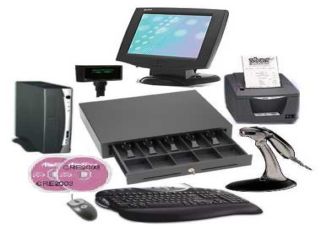
How to Turn Your Computer Into a Cash Register

If you run a small business, you may not have enough turnover to justify both a PC and a cash register. Luckily, you can turn your PC into a cash register. All you need is point of sale (POS) software and, if you want, peripheries to print receipts and store cash. By downloading and using this software you can streamline your business expenses and become more efficient. 

Instructions Freeware:

1 - Download free POS software. One example is created by software developer Dale Harris, and can be found in the resources.

2 - Purchase a cash drawer, receipt printer and bar code scanner. Use a regular printer if you do not want to purchase a receipt printer.

3 -  Attach the scanner, printer and cash drawer to your computer. This freeware requires you to attach these through your serial port, not your parallel port. Your serial port is a short, fat port with connections pointing outwards; your parallel port is longer and thinner with holes to connect to.

How to Turn Your Computer Into a Cash Register, Cash Registers, Computer Cash Registers,


Software: 

4 -   Purchase a program like Cash Register Plus. This comes with all the hardware mentioned in step 1 and costs $799 as of September 2010.

5 -  Install the program, following the steps on the screen. Attach your hardware when asked to do so.

6 -  Add your stock to the program, so that the receipt scanner recognizes your bar codes.