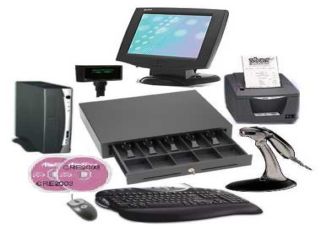
Computer Cash Registers
Computer Cash RegistersComputer cash registers in electronic and POS form are made by companies like Samsun, Sharp, and Sanyo for commercial use.
Computer cash registers can be essential equipment for any retail business or store. They can provide you with the necessary tools to control every aspect of your business from one console, offering unrivaled convenience like you’ve never seen before. They can be capable of tracking sales so that you can determine your busiest hours of operation, as well as most popular items. But what’s more, they can also track your inventory so that you always know when the time comes to order new product. With computer cash registers you’re always prepared, and can keep your business running as smoothly as possible.
When you’re looking to buy computer cash registers, there are a variety of different types that you will be able to choose from. The right ones will usually be best adapted to your specific business, in the format that they operate as well as the system that they employ. You’ll want to consider your available budget as well, because purchasing a very advanced system will make your operation more convenient, but can also be difficult to pay for. The main thing will be finding the type of computer cash registers that offer the features you want, without going beyond the budget that you have available.

The best system for any computer cash registers is always going to be employing POS operation. POS stands for point of sale, and is a system where an item’s barcode is scanned into your computer console, and then the register can total the sale, as well as record it against your inventory of the same item. This is useful for keeping track of how many items you’ve sold, as well as when you need to order more items to outfit your store. This can help you keep on top of your sales, so that customers can always find the products that they want. This is a key component for providing the best customer experience possible.
Another factor to consider, is buying touch screen computer cash registers. These can make operation easier for employees, as they require little to no training, but can also double as self checkout stations. This means you can either assign a member of staff to personally help customers, or allow your customers to help themselves. This can be great to provide assistance to those that would like help, but also stay out of the way of customers that prefer to do things on their own. With touch screen computer cash registers, everyone is happy, and able to experience the store in the way that makes them most comfortable.
When you’re looking to buy any type of computer cash registers, usually you’ll need a POS software system designed first. That means going through a company like AccuPOS.com, who can develop software specifically for your company. Typically a POS system can cost you into the thousands to develop, but is worth the price for the added convenience. Monitors and computer cash registers can be purchased for a few hundred afterward, so that you can outfit your store with the perfect number of consoles to utilize your POS software.
Computer cash registers can be essential equipment for any retail business or store. They can provide you with the necessary tools to control every aspect of your business from one console, offering unrivaled convenience like you’ve never seen before. They can be capable of tracking sales so that you can determine your busiest hours of operation, as well as most popular items. But what’s more, they can also track your inventory so that you always know when the time comes to order new product. With computer cash registers you’re always prepared, and can keep your business running as smoothly as possible.
When you’re looking to buy computer cash registers, there are a variety of different types that you will be able to choose from. The right ones will usually be best adapted to your specific business, in the format that they operate as well as the system that they employ. You’ll want to consider your available budget as well, because purchasing a very advanced system will make your operation more convenient, but can also be difficult to pay for. The main thing will be finding the type of computer cash registers that offer the features you want, without going beyond the budget that you have available.
The best system for any computer cash registers is always going to be employing POS operation. POS stands for point of sale, and is a system where an item’s barcode is scanned into your computer console, and then the register can total the sale, as well as record it against your inventory of the same item. This is useful for keeping track of how many items you’ve sold, as well as when you need to order more items to outfit your store. This can help you keep on top of your sales, so that customers can always find the products that they want. This is a key component for providing the best customer experience possible.
Another factor to consider, is buying touch screen computer cash registers. These can make operation easier for employees, as they require little to no training, but can also double as self checkout stations. This means you can either assign a member of staff to personally help customers, or allow your customers to help themselves. This can be great to provide assistance to those that would like help, but also stay out of the way of customers that prefer to do things on their own. With touch screen computer cash registers, everyone is happy, and able to experience the store in the way that makes them most comfortable.
When you’re looking to buy any type of computer cash registers, usually you’ll need a POS software system designed first. That means going through a company like AccuPOS.com, who can develop software specifically for your company. Typically a POS system can cost you into the thousands to develop, but is worth the price for the added convenience. Monitors and computer cash registers can be purchased for a few hundred afterward, so that you can outfit your store with the perfect number of consoles to utilize your POS software.